
Add-ons are optional features that enhance your CallHippo communication experience, and you can manage them directly from your dashboard. This guide walks you through how to check your active add-ons, purchase new ones, and remove add-ons you no longer need.
What are add-ons?
Add-ons are optional features that can be attached to your CallHippo plan to expand your account’s capabilities. They are available on all paid plans and can be added or removed at any time directly from your dashboard.
Available add-ons and pricing
| Add-on | Description | Pricing |
|---|---|---|
| Call Scribe | Provides call transcription services for recorded calls. | $15/user/month |
| Dashboard User | Dashboard access without web dialer access. | $15/user/month |
| CNAM | Displays your business name on incoming USA calls. | $100 one-time |
| SMS Services | Enables SMS services in the US & Canada. | $3/month + $15 setup |
| Remediation Service | Helps remove spam labeling from numbers. | $100/number |
| Spam Watch | Monitors number health for spam-free dialing (applicable for USA/Canada). | $3/number/month |
| AI Coaching | AI-powered communication insights and coaching. | $10/user/month |
How to check your available add-ons
- Log in to your CallHippo dashboard. Sign in to your CallHippo account.
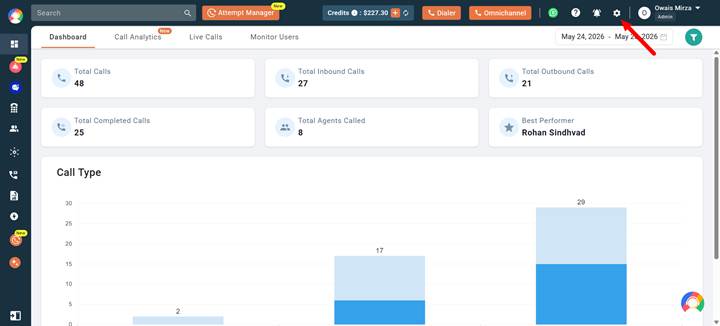
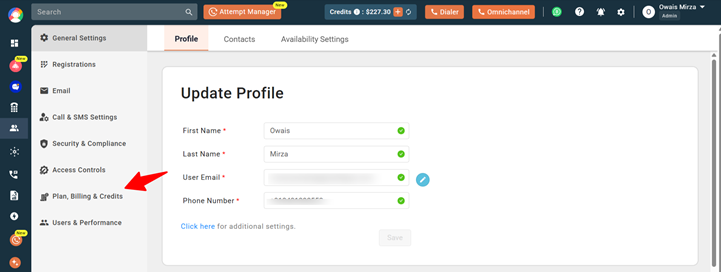
- Open Plan, Billing & Credits. Click the Settings (gear) icon in the top-right corner and navigate to Plan, Billing & Credits.
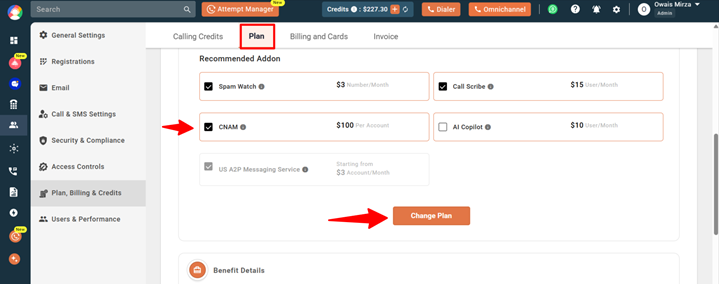
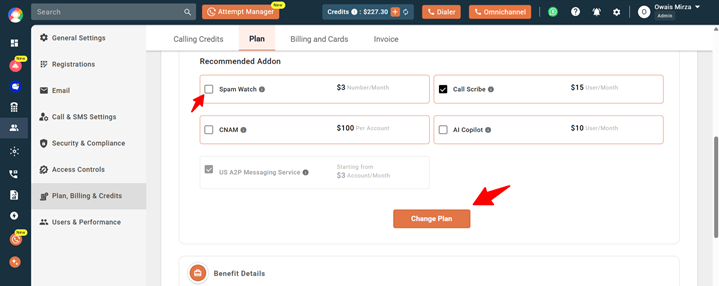
- View your add-ons. Checked add-ons are already active on your account. Unchecked add-ons are available for purchase.
How to add an add-on
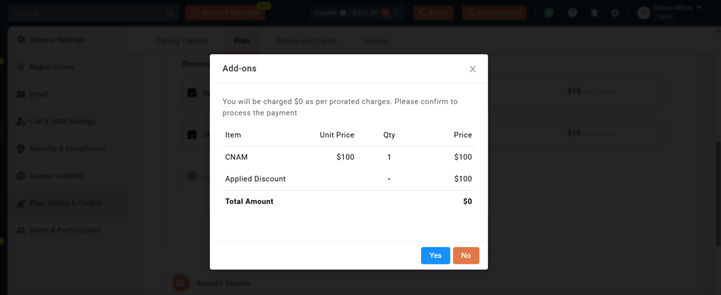
Select the add-on you want to purchase and click the Change Plan button. A confirmation popup will appear displaying the pricing details. Click Yes to confirm the purchase.
How to remove an add-on
Uncheck the active add-on and click the Change Plan button. Confirm the removal in the popup window.
Frequently asked questions
Will I be charged immediately after adding an add-on?
Yes. Charges are applied instantly on a pro-rated basis.
Can I preview pricing before purchasing?
Yes. Pricing is shown in the confirmation popup before you complete the purchase.
Are add-ons available during the free trial?
No. Add-ons cannot be purchased during the free trial period.
Can I manage add-ons myself?
Yes. You can add or remove add-ons directly from your dashboard at any time.
We hope this helps. If you still have questions, feel free to reach out at [email protected].