
Not sure how to change your CallHippo plan? Whether you want to unlock more features or switch to a smaller plan, you can do it easily from your CallHippo dashboard. This step-by-step guide walks you through upgrading or downgrading your plan in just a few clicks.
Steps to change your plan
- Log in to your CallHippo dashboard.
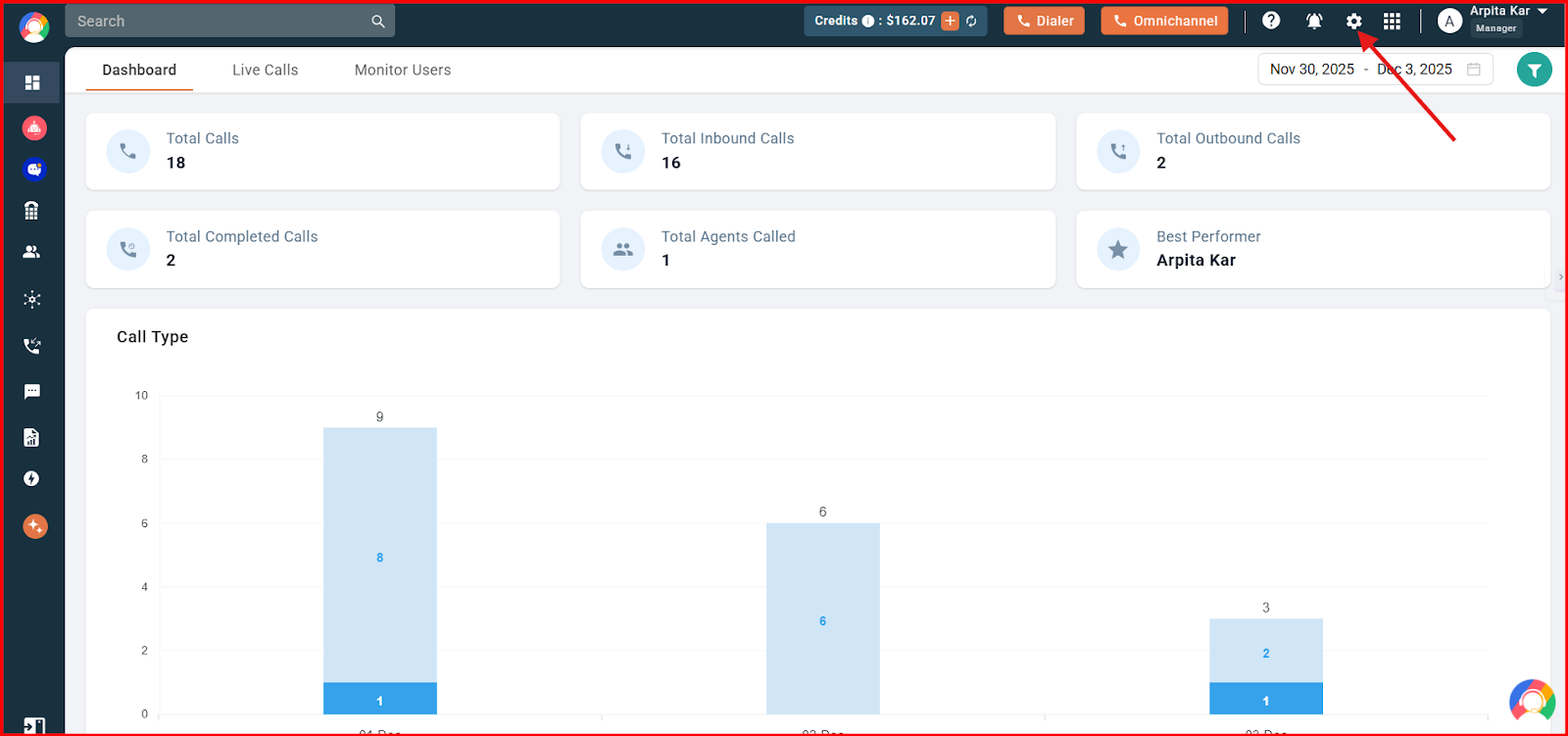
- Click the settings (gear) icon in the top-right corner of the screen, then select Plan, Billing & Credits.
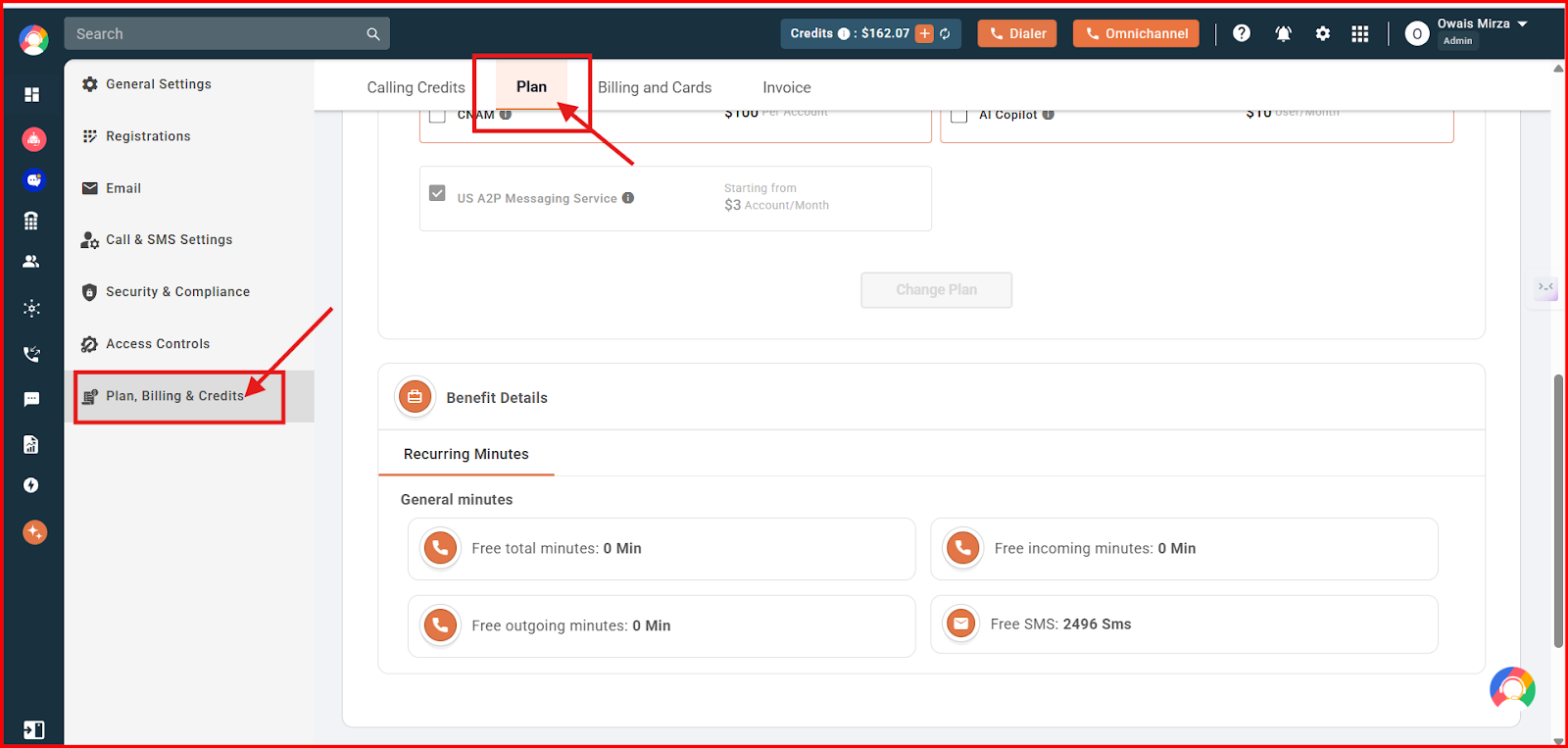
- In the Plan, Billing & Credits section, click the Plan option.
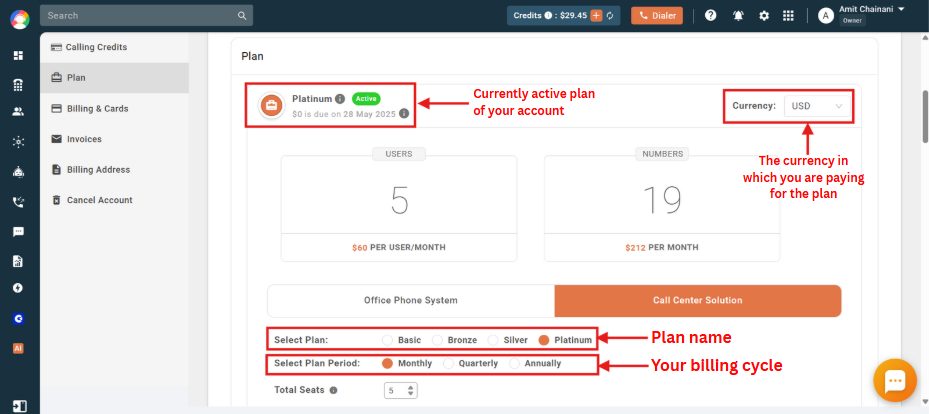
- You will see the details of your currently active plan, including your billing currency, plan name and billing cycle.
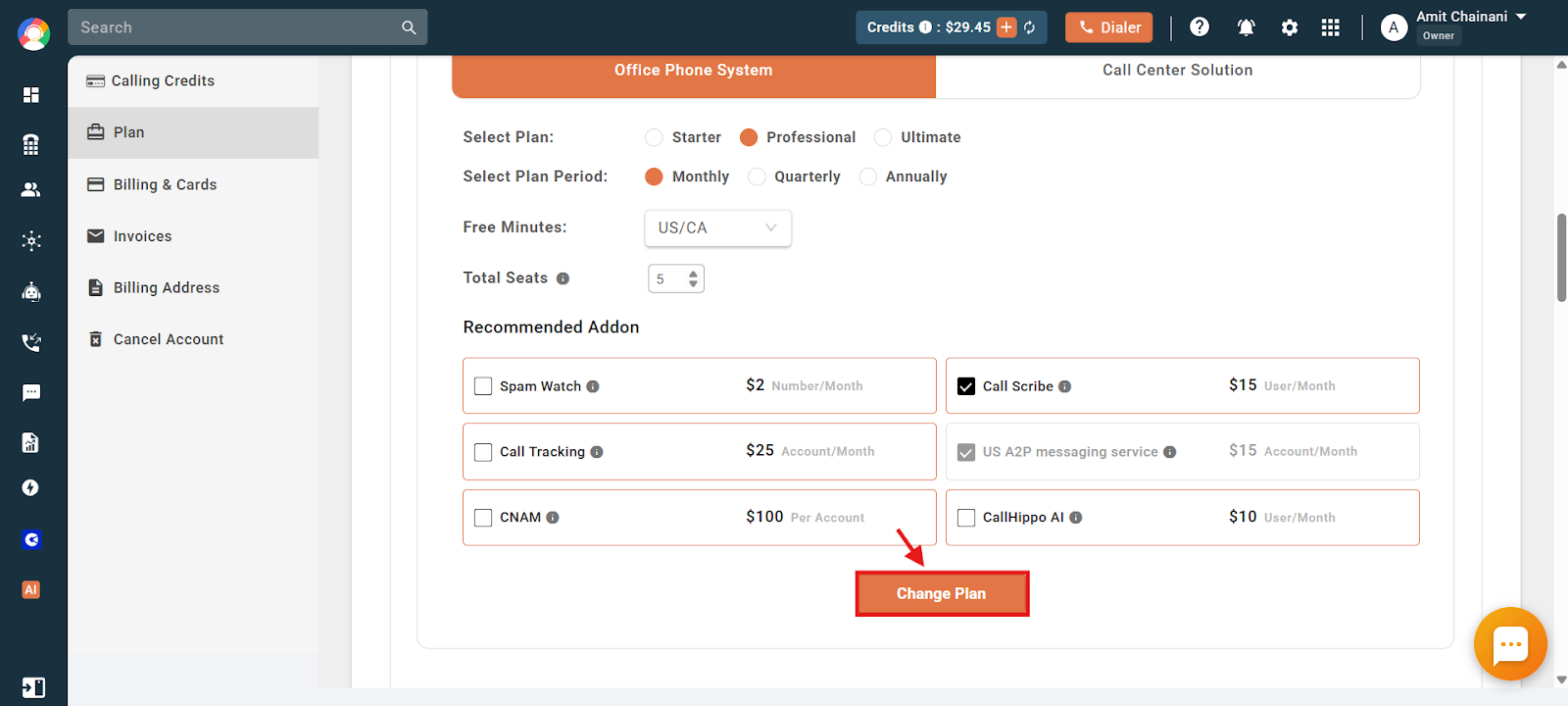
- View the different plans available under Office Phone System and Call Center Solutions.
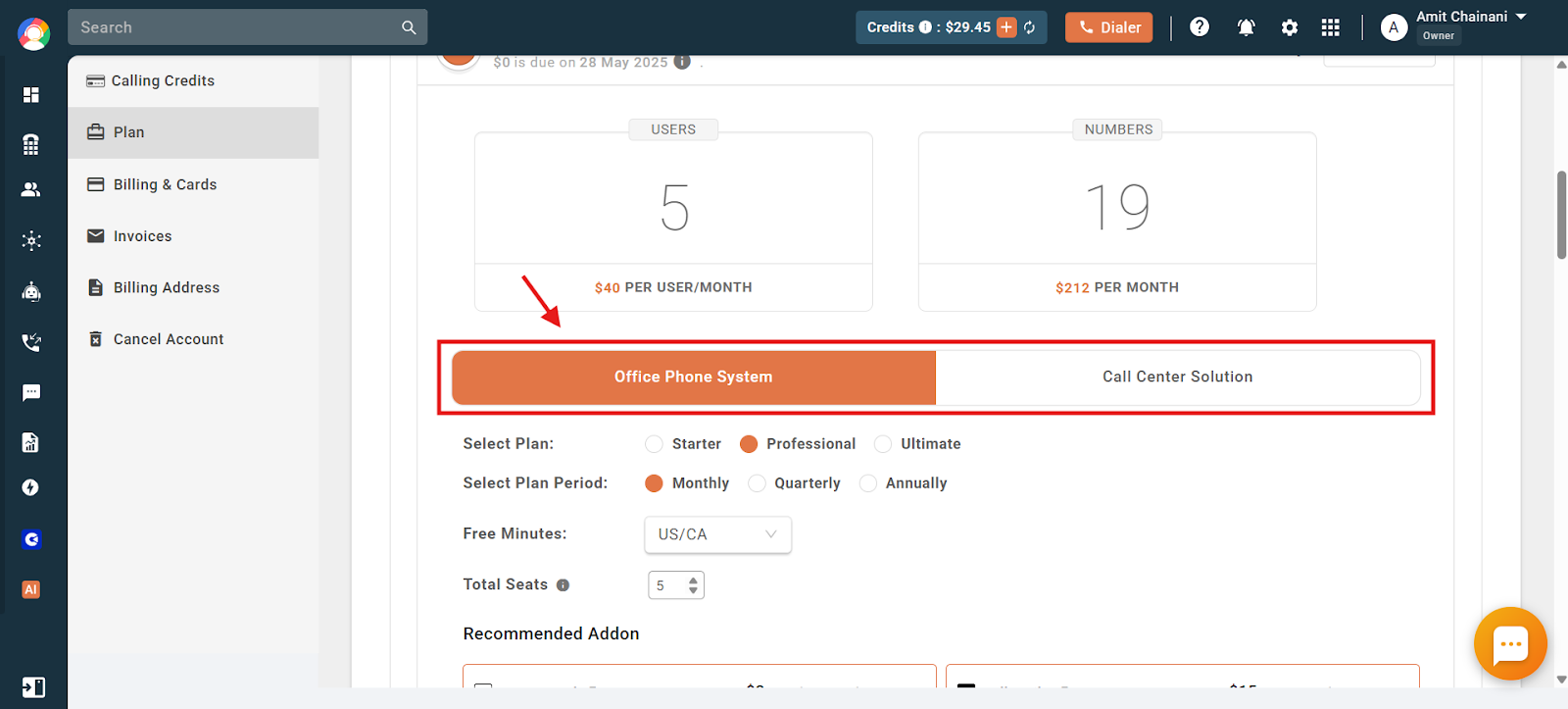
- Before upgrading, make sure the correct plan name, billing cycle, free minutes and preferred billing currency are selected.
- Click Change Plan to finally save and change the plan.
Plan change processing time
The time it takes to change your CallHippo plan depends on the type of switch you are making.
1. Front-end changes (instant)
Some plan upgrades or downgrades can be processed directly from the dashboard. These changes happen instantly once the payment is successful or the downgrade is confirmed.
Examples:
- From any Call Center Solution plan to any Office Phone System plan.
- From any Call Center Solution plan to any Call Center Solution plan, if the free minutes benefit region is the same.
- From any Office Phone System plan to any Office Phone System plan, if the free minutes benefit region is the same.
- A change in the billing period (any).
- From a trial plan to any paid plan.
2. Backend changes (24-48 business hours)
In some cases, the plan change cannot be completed from the front end and must be handled manually by our accounts team. These changes typically take 24 to 48 business hours to process. In such cases, contact the support team via chat or email at [email protected] for the plan change.
Examples:
- From any Office Phone System plan to any Call Center Solution plan.
- Any change in the free minutes benefits region. (Example 1: Professional US/CA to Professional UK; Example 2: Bronze AUS to Professional Global; Example 3: Starter UK to Starter US/CA)
- Changing your preferred currency from any currency to INR.
Make sure to pre-plan your subscription changes to avoid any delay.
Important note: You will not be able to see the supported features when changing the plan from the dashboard. To check the features, visit our plan and features page: https://callhippo.com/pricing/
Frequently asked questions
Q: Will I be charged immediately when I upgrade my plan?
A: Yes, upgrading your plan will charge the payment method on file immediately. If you switch from a lower plan to a higher one, you will be charged the prorated difference based on the remaining billing cycle.
Q: Can I upgrade my plan at any time?
A: Yes, you can upgrade your plan at any time from the CallHippo dashboard under the Plan and Billing section. The changes take effect immediately after successful payment.
Q: What happens to my current subscription if I upgrade?
A: When you upgrade:
- Your current subscription amount is adjusted based on the new plan.
- Any unused portion of your current plan is prorated and applied to the new plan.
- Additional features included in the new plan become available immediately.
Q: How do I check if my plan has been successfully upgraded?
A: You can check the details from your profile section under the Plan and Billing section by going to Plan.
Q: If I am downgrading the plan, will I get a refund of the larger amount I paid earlier for the higher plan?
A: No, you do not get a refund of the higher plan when downgrading.
Q: Since I am upgrading my plan as well as adding more users, can the support team help me with a discounted price?
A: No, the pricing visible to you on our pricing page/dashboard is the final pricing offered. The support team will not be able to help you with any discount.
Q: What changes will take place if I change my plan?
A:
- Your billing date stays the same.
- You will be charged instantly on a prorated basis for the number of days remaining in your billing cycle.
- Your previous plan benefits and the amount you paid for them will no longer be applicable.
Q: Can I change my plan multiple times?
A: Yes, but each change results in a new prorated charge based on the current billing cycle. Consider your needs carefully before switching plans multiple times.
Q: If I purchase the US/UK calling plan, can I upgrade it to include Australia minutes later?
A: Yes, you can upgrade to a plan that includes Australia minutes. However, since this changes the free minutes region, the upgrade must be processed manually. Reach out to the support team to request the change.
Q: Will my users be affected when I change the plan?
A: Yes, user access to features automatically updates based on the new plan. Features not included in the new plan are removed right away.
Q: Can I schedule a plan change for a future date?
A: Yes, while plan changes from the dashboard apply instantly, you can contact the support team to request a scheduled plan change in advance.
Q: What happens to my call credits when I change the plan?
A: Existing call credits remain in your account. However, your new plan’s free minutes and benefits may vary based on the region and plan type.
Q: Can I change my billing currency without changing my plan?
A: Yes, you can change your billing currency instantly from the dashboard, except when switching to or from INR. For INR currency changes, please contact our support team.
Q: Will I receive an invoice for the prorated charge when I upgrade?
A: Yes, a detailed invoice reflecting the prorated amount will be available in the Billing section of your dashboard.
Q: How do I know which plan is right for me?
A: Visit our pricing page to explore plan features. Choose based on your call volumes, user count, region and feature requirements.
We hope this helps. If you still have questions, feel free to reach out at [email protected].