
SIP ALG is enabled by default on most NETGEAR routers and often interferes with VoIP traffic, causing failed registrations, dropped calls, and one-way audio. This guide explains what SIP ALG is and how to disable it using the NETGEAR genie interface.
What is SIP ALG?
SIP ALG stands for Session Initiation Protocol Application Layer Gateway. It is built into most commercial routers to help VoIP traffic pass through the router firewall by inspecting SIP packets and modifying them when needed. By default, NETGEAR routers ship with SIP ALG turned on.
How SIP ALG affects VoIP
Although SIP ALG is meant to help, it is frequently implemented poorly and causes more problems than it solves. It can alter SIP packets in unexpected ways, corrupting them so they become unreadable. The result is behavior such as phones failing to register, incoming calls not connecting, and dropped or one-way calls. If you are experiencing these issues, we recommend disabling SIP ALG on your router.
How to disable SIP ALG on a NETGEAR router
Use the NETGEAR genie interface to turn SIP ALG off:
- Connect to the NETGEAR router using a wired or wireless connection.
- Open a browser and go to http://www.routerlogin.net (or 192.168.1.1 / 192.168.1.3) to access the router’s interface.
- Enter your login and password. If you haven’t changed them, the default username is admin and the default password is password.
- On the NETGEAR genie page, click ADVANCED.
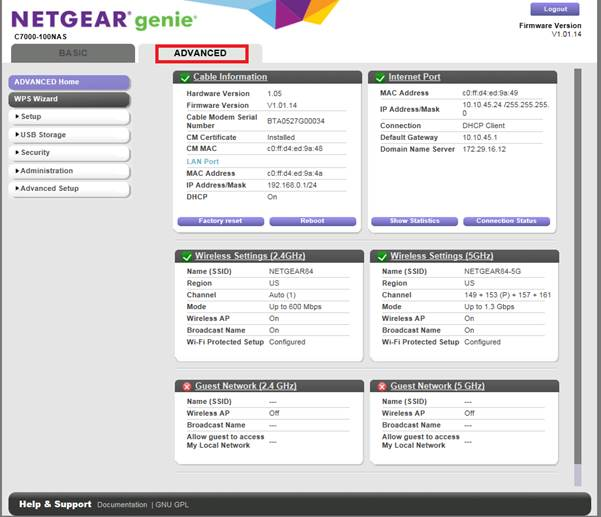
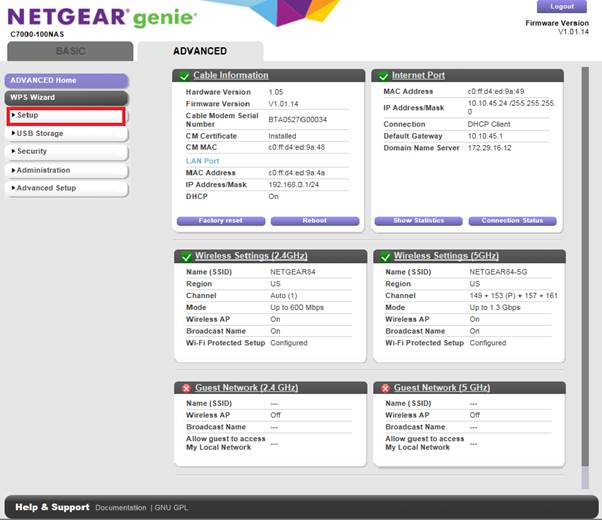
- Click Setup.
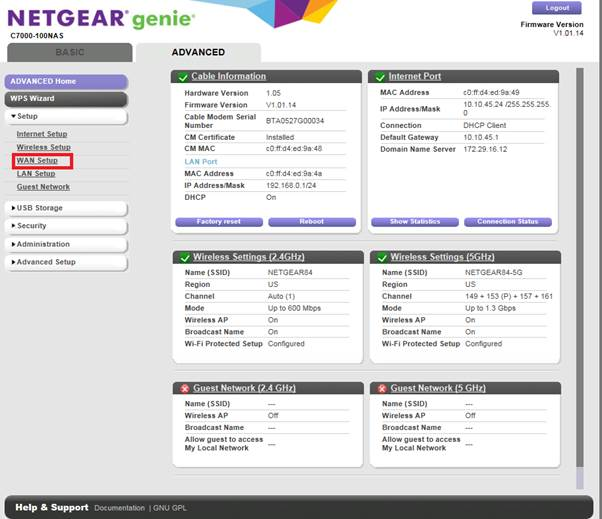
- Click WAN Setup.
- On the WAN Setup page, select Disable SIP ALG.
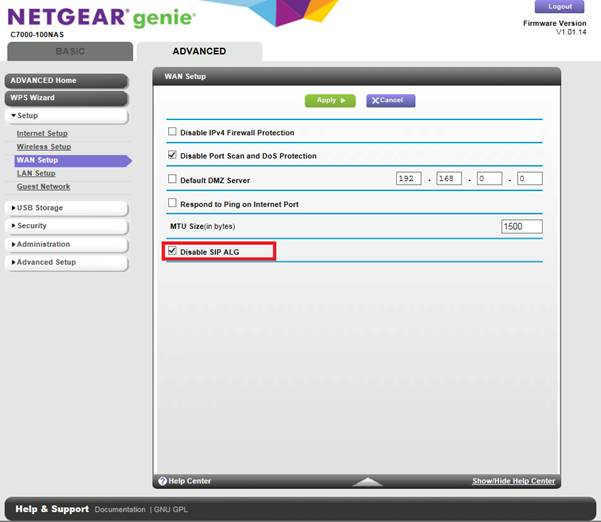
- Click Apply to save the settings.
Disabling SIP ALG resolves many VoIP connectivity issues. If problems continue after making this change, reach out to CallHippo support for further assistance.
Frequently asked questions
What role does SIP ALG play in VoIP communication?
SIP ALG is meant to help VoIP traffic pass through firewalls by modifying SIP packets, but it often causes more harm than good by interfering with VoIP communication.
How can SIP ALG interfere with my VoIP service?
It can rewrite SIP packets in a way that disrupts phone registration, causes dropped calls, or leads to one-way audio where only one person can hear the other.
Why does CallHippo recommend disabling SIP ALG for VoIP?
Because SIP ALG can corrupt or block VoIP traffic, disabling it ensures your phone system communicates directly and reliably with CallHippo’s servers.
My calls keep dropping after a set time (for example, after the 11th minute). Could my NETGEAR router be the cause?
Yes. If SIP ALG is enabled on your NETGEAR router, it can interfere with your VoIP traffic and cause dropped calls. Disabling SIP ALG is recommended to resolve this.
I can make outgoing calls but can’t receive incoming calls. What’s going on?
This is a common symptom of SIP ALG interference. Disabling SIP ALG in your router’s WAN Setup settings can help restore full VoIP functionality.
People can hear me, but I can’t hear them. Is my internet the problem?
This one-way audio issue is often caused by SIP ALG modifying VoIP traffic. Turning off SIP ALG on your NETGEAR router usually resolves it.
Still need help? Reach us at [email protected].