
CallHippo’s custom webhook lets you push your call and SMS data to any third-party system or internal application in real time, so you can build your own reporting, automation, or CRM sync on top of CallHippo activity.
Set Up the Webhook in CallHippo
You configure the webhook from the REST API section of your Integrations page. Follow these steps:
- Log in to your CallHippo account at https://web.callhippo.com.
- Open Integrations from the side menu.
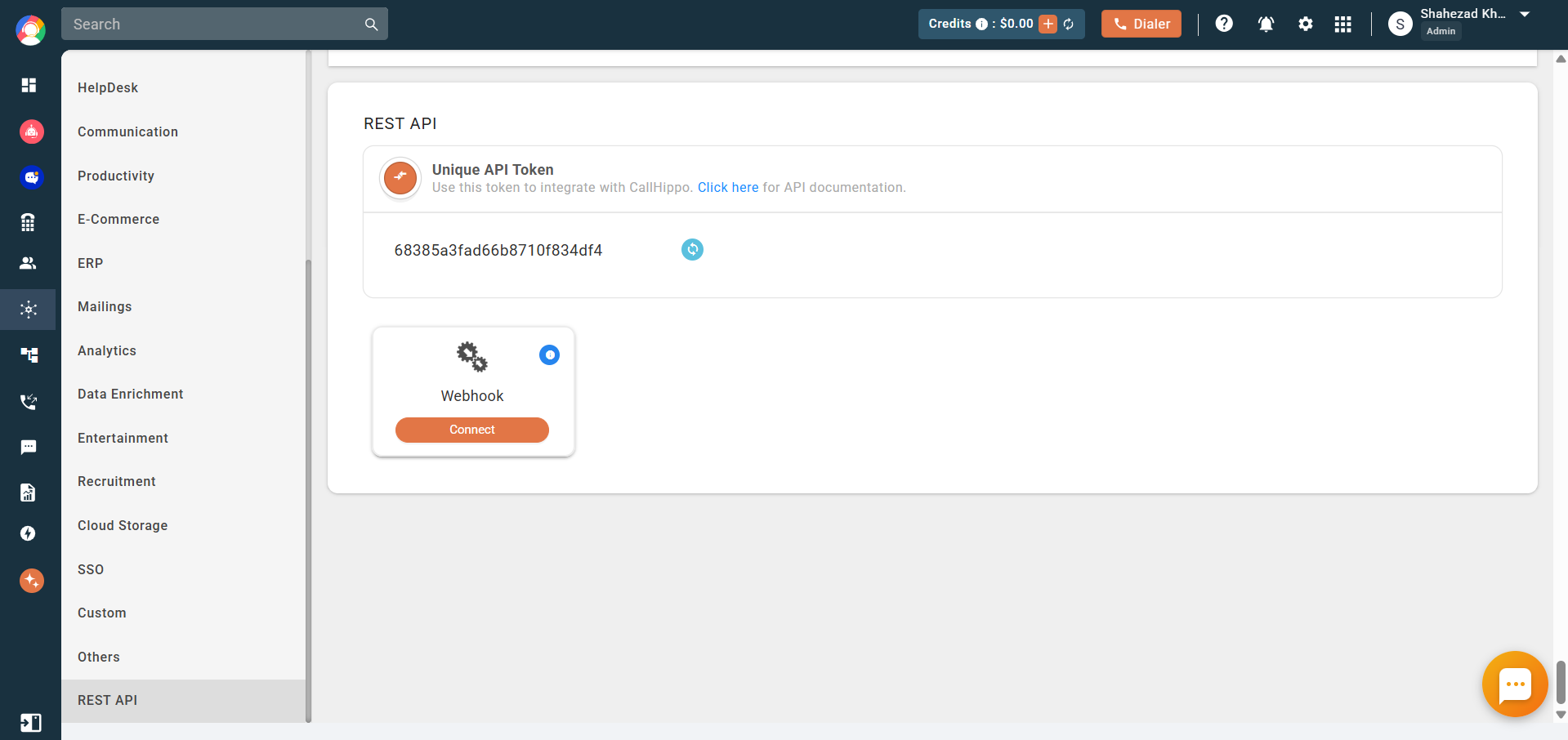
- Find the REST API section, then locate the Webhook card and click Connect.
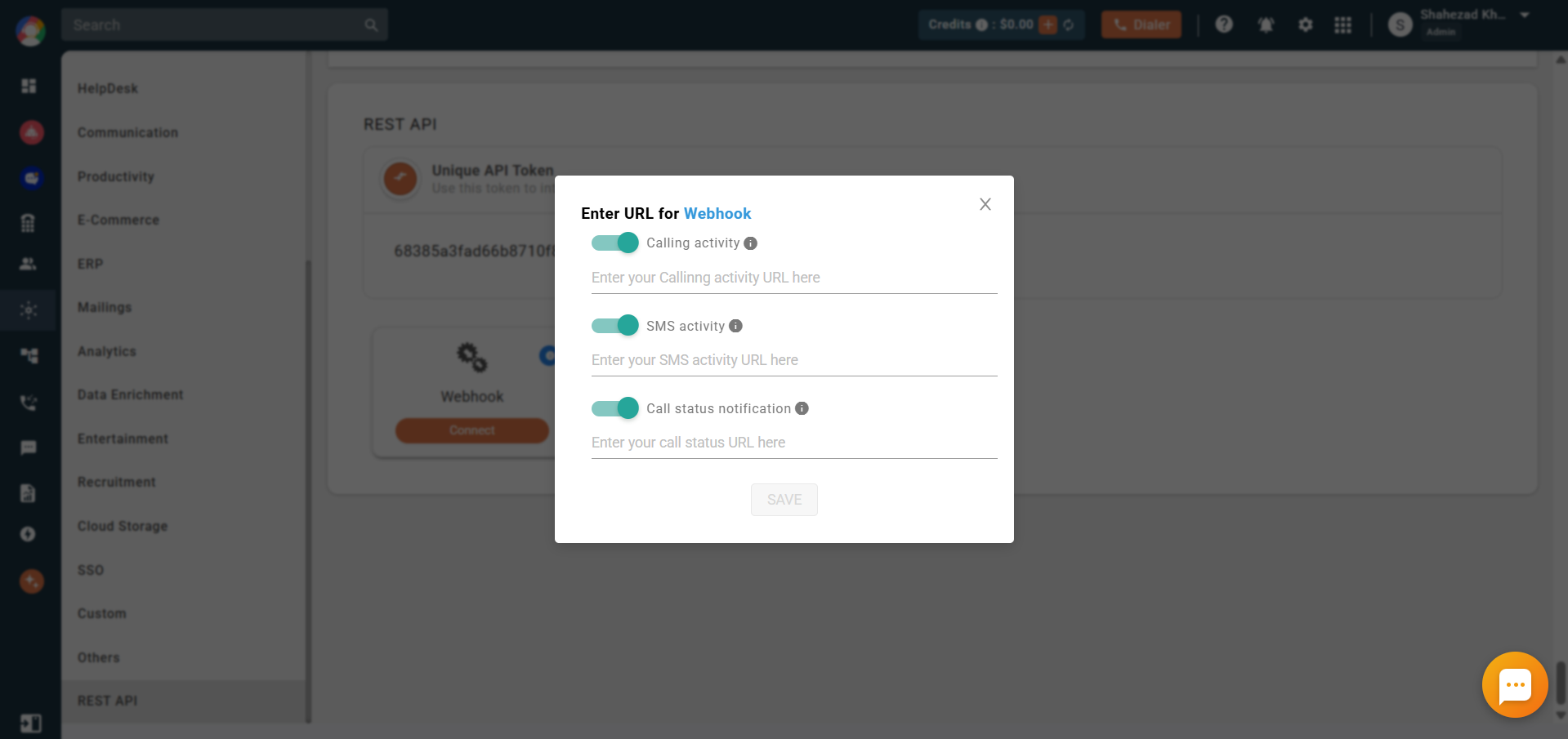
- Enter your URLs in the popup for the events you want to receive, then click Save. You can enable any combination of the toggles below.
Webhook Events You Can Enable
- Calling Activity: When enabled, all call logs are sent to your webhook URL.
- SMS Activity: When enabled, all SMS logs are sent to your webhook URL.
- Call Status Notification: When enabled, all call events are sent to your webhook URL.
- Call Notify: Available on request and works with the predictive dialer. When enabled, the agent is notified whenever a call is picked up by the receiver.
Your endpoint should be an HTTP/HTTPS URL that accepts the POST method. After every call or SMS, CallHippo delivers the data to your URL via POST in JSON format.
Sample Payloads
Call Activity response:
{
  "type": "call",
  "from": "+15709894XXX",
  "to": "+919724706XXX",
  "callType": "Outgoing",
  "duration": "00:02",
  "durationSeconds": 2,
  "status": "Completed",
  "reason": "IVR Message",
  "time": "2025-06-23T13:13:50.000Z",
  "startTime": "2025-06-23T13:13:50.000Z",
  "endTime": "2025-06-23T13:13:58.000Z",
  "callCharge": "0.06",
  "email": "[email protected]",
  "adminEmail": "[email protected]",
  "callSid": "CA98d34afc6604c2ee36b7fb24d9308XXX",
  "countryName": "India",
  "answeredDevice": "web",
  "billedMinutes": 1,
  "hangupBy": "Client",
  "tags": ["Test Tag"],
  "dispositions": ["Test Dispo"],
  "callQueue": false,
  "dialCode": "91",
  "recordingUrl": "https://callhippo-media.s3.amazonaws.com/.../recording.mp3",
  "extraParams": {
    "virtualNumber": "+916357891557",
    "campaignId": "5007",
    "agentId": "633fb717568eb306d3dc2ec6",
    "crmUniqueId": "17448046682131095"
  }
}
SMS Activity response:
{
  "activityType": "sms",
  "content": "SMS text goes here",
  "from": "+9323243432",
  "to": "+41232132131",
  "smsType": "Outgoing",
  "status": "Completed",
  "time": "2020-05-12T00:53:57.688+0000",
  "smsCharge": "0.040",
  "email": "[email protected]",
  "smsSendBy": "Demo User",
  "adminEmail": "[email protected]"
}
Call status notification response:
{
  "agentEmail": "[email protected]",
  "callType": "Outgoing",
  "fromNumber": "+17xxxxxxxx6",
  "toNumber": "+13xxxxxxxx0",
  "agentId": "610xxxxxxxxxxxxxxxxxx8f3",
  "callSid": "8956bxxxxxxxxx-xxxxxx-xxxxxx02428",
  "dateTime": "2024-03-28T10:05:50.000Z",
  "dialCode": "1",
  "status": "completed"
}
Response Parameters
- activityType: call or sms.
- from / to: The originating and destination numbers.
- callType / smsType: Incoming or Outgoing.
- duration: Call duration (MM:SS).
- status: Call status — Completed, Missed, Rejected, Voicemail, Welcome message, IVR message, Unavailable, Cancelled, or No Answer.
- time / startTime / endTime: Log-created, call-start, and call-end timestamps.
- callCharge / smsCharge: Charges for the call or SMS.
- callerName: Name of the CallHippo user (optional).
- note: Call notes (optional).
- recordingUrl: Recording URL for the call (optional).
- extraParams: campaignId, agentId, crmUniqueId, virtualNumber (optional).
- callSid: Unique ID of the call.
- email / adminEmail: Agent email and account-owner email.
- countryName: Name of the calling country.
- answeredDevice: web, ios, or android (optional).
- ringAnswerDuration: Ring duration (mm:ss).
- billedMinutes: Total billed minutes for the call.
- hangupBy: Agent or Client.
- tags / dispositions: Tags and dispositions added by the agent.
- callQueue: Whether the call entered the call queue (true/false).
- content: SMS text (for SMS activity).
- smsSendBy: Name of the agent who sent the SMS.
FAQ
Which HTTP method does CallHippo use to send data?
CallHippo always delivers webhook data using the POST method in JSON format. Your endpoint must accept POST requests.
Can I send call and SMS data to different URLs?
Yes. Each activity type has its own URL field, so you can route calling activity, SMS activity, and call status notifications to separate endpoints.