
Smart Switch works silently in the background to make sure every call goes through the strongest available provider — so you can focus on the conversation, not the connection.
What is Smart Switch?
Smart Switch is an intelligent call-routing feature in CallHippo that lets calls move between multiple telephony providers. If one provider runs into trouble, your call is instantly routed through another reliable option.
Why Smart Switch is important
VoIP providers, like mobile networks, can sometimes experience outages or poor call quality. Smart Switch prevents these issues from affecting your calls by always routing them through the most stable network available.
Key benefits at a glance
- Automatic failover — calls are instantly rerouted if the primary provider fails or call quality drops.
- Manual switching — easily change providers from the dial pad before placing a call, if needed.
- Better call quality — fewer call drops, clearer audio, and more reliable connections.
- Priority call routing — route important or time-sensitive calls through the best-performing provider.
- Custom call flows — set routing rules based on your business needs for faster, smoother communication.
- Improved customer experience — fewer disruptions mean more professional, trustworthy conversations.
How to use Smart Switch in CallHippo
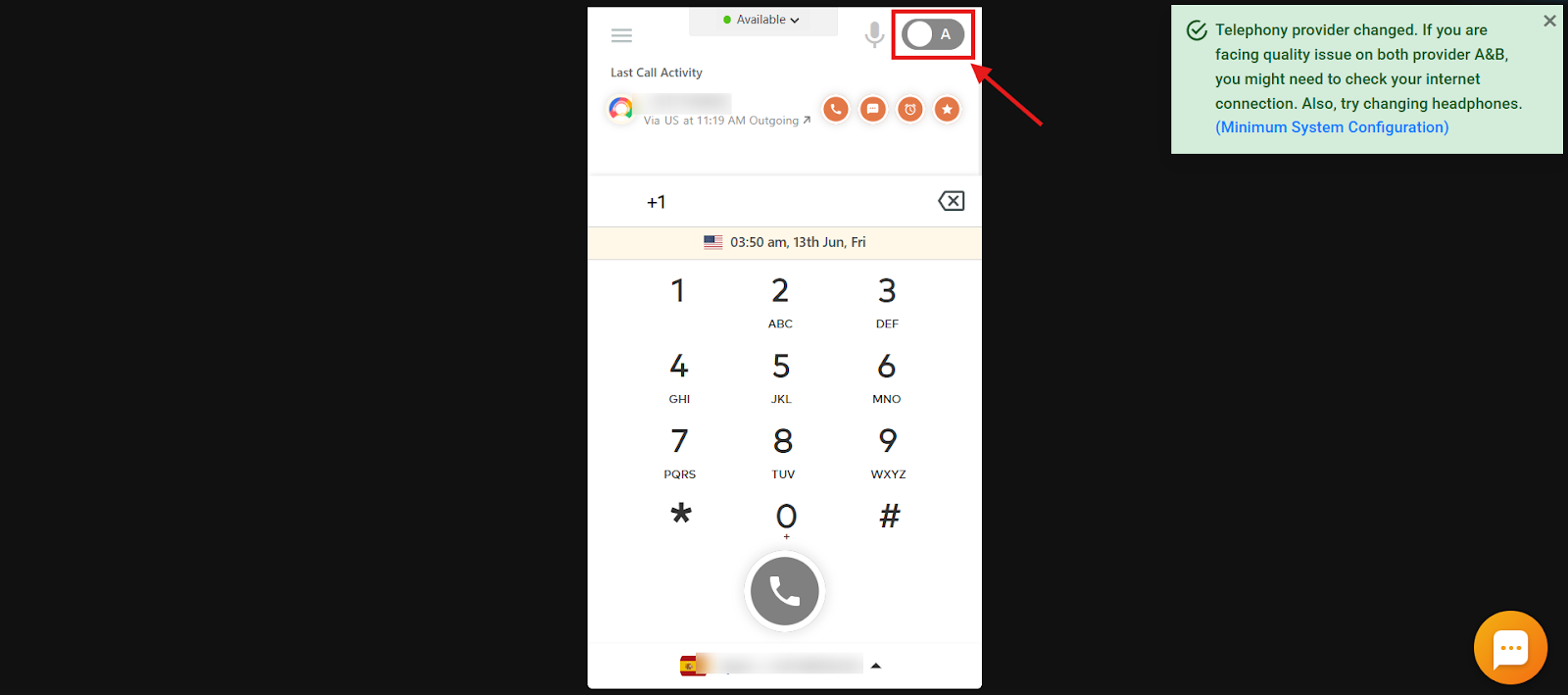
- Log in to the CallHippo dialer. Open your CallHippo dial pad, where you’ll find the Smart Switch toggle.
- Choose a provider. By default, the system uses a primary provider (e.g., Provider A). If needed, toggle to another option (e.g., Provider B) to initiate the switch.
- Check the confirmation message. After switching, a pop-up confirms that the new provider is active for your next call.
When to use Smart Switch
Use Smart Switch whenever:
- You face audio quality issues such as distortion or lag.
- Calls are not connecting through your current provider.
- You want to optimize performance for time-sensitive or high-priority calls.
By using Smart Switch, CallHippo helps your business stay connected no matter the network conditions — an essential tool for maintaining professionalism and keeping your VoIP communications running smoothly.
Frequently asked questions
Why would I need to switch providers during a call?
If your current provider experiences call drops, audio distortion, or fails to connect, Smart Switch lets you reroute through a more reliable provider.
How does Smart Switch improve call quality?
It ensures calls are always made through the best available network, reducing lag, distortion, and drops by dynamically selecting the most reliable provider.
Do I need to configure anything to use Smart Switch?
No special setup is needed. Just access the feature through your CallHippo dialer and toggle to the desired provider.
Will Smart Switch interrupt an ongoing call?
No. You can’t change Smart Switch during an active call — it applies before a call is connected. For best results, switch providers before placing your call.
How does Smart Switch handle provider outages?
It detects the issue and automatically reroutes the call through an alternative provider, avoiding downtime.